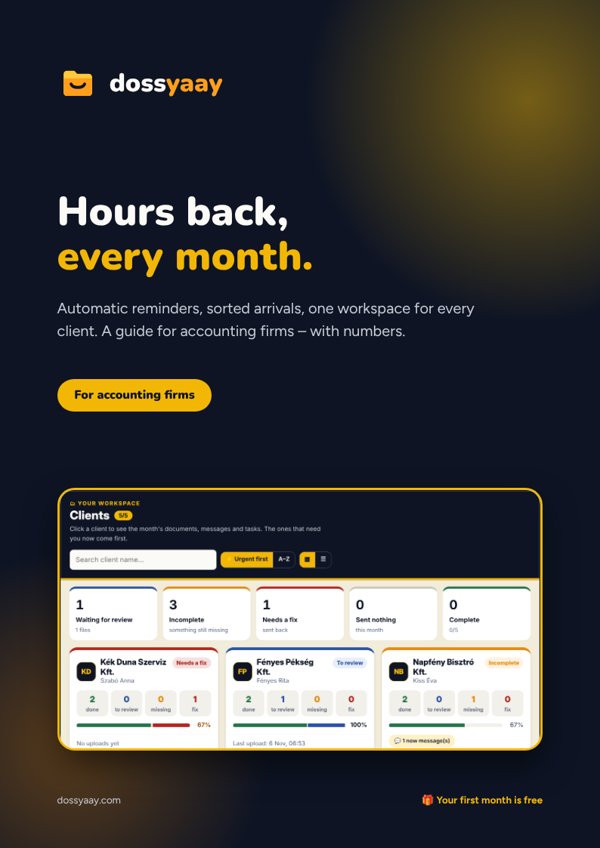
Set up each client's monthly list once; after that it is requested automatically every month.
A clean summary for each client
One screen: who is done, who is late, what is still missing and how long until the deadline.
Automatic reminders
The system reminds the client before the deadline â you don't have to chase.
Documents both ways
Payslips, salary transfer lists and tax notices to the client â and you see when they opened them.
Many clients, one place
All your clients on one dashboard, with a monthly ZIP download sorted by segment.
Deadlines and milestones
Weekly, monthly, quarterly and yearly tasks in one calendar, per client or for everyone.
đ Learn by doing
What you get with Dossyaay â in three small experiments
How much time chasing takes, how the rhythm works, and what sorted arrivals are worth.
1
Do the maths
How much time goes on chasing each month?
Asking, reminding, âdid you get it?â. Set the sliders for your own office.
By hand36reminder emailsâ 3.6 h
Dossyaay0you have to writeâ 0 h
Assumption: a late client needs asking three times on average. Dossyaay sends these to the 12 clients by itself â 7, 3 and 1 days before, and on the day â and you get a summary.
2
The reminder rhythm
Move the day â watch the month fill up
12 clients, one deadline. Automatic reminders 7, 3 and 1 days before, and on the day.
â
â The month starts: everyone gets their list.
1/12 done.
3
Try it
Sort the inbox â or get it sorted
Six attachments came by email. Put each in its place (click the right section) and watch the clock.
Pick a client, request what is missing and watch the client's phone: the request arrives and the documents come back. Open each one, review it â and decide: accept it, or ask for a fix. Careful: not every file is what it should be!
Accounting firm · Clients
Waiting for 10 documents in total · next deadline:
Client 1
Bank statement
Missing
Sales invoices
Accepted â
Purchase invoices
Missing
Payroll recordstimesheet_oct.pdf
Cash book
Accepted â
Send to client
Payslips â Oct.pdf
Your clients don't need to create an accountComing soon
You fill in the client's profile once in your own account, then send them the link. They sign in with a one-time code and upload â no registration, no password.
How you use it
1
Add the client
Company name, email and the monthly document list â one minute per client.
2
Send the link
The client gets an email and sees right away what you need from them.
3
Review and download
Accept, ask for a fix, or download the whole month's files in one click.
You own the deadline â Dossyaay helps everything arrive on time
The accountant takes responsibility for processing documents on time. Dossyaay gives that order: visible deadlines, reminders and a log of what arrived when.
Pricing
Simple pricing, no hidden costs
Choose who you are and move the slider â the price updates instantly.
đ Your first month is free â âŹ0 today
â±ïž Hours per client every month â that's what Dossyaay gives back.
đ We send the reminders. You do the accounting.
đïž Every document in its place, by client and section â not in your inbox.
đ See who opened what and when. No more âdid you get it?â.
đ When every client is green, the month is done. Yaay.
Every plan includes
â Monthly document list per client
â Automatic reminders
â Accept / ask for a fix in one click
â Messages and broadcasts
â Deadline calendar
â ZIP download
â Own branding from Plus
â±ïž How much time do you save?
Estimate how much time goes on chasing and hunting for documents each month.
Time savedâ 5.0 hours / month
WorthâŹ150.007Ă the monthly fee
Estimate: Dossyaay takes about 60% of the chasing and searching off your plate.
Compare plans
Start
Plus
Pro
Office
Price / month (incl. VAT)
âŹ25.39 net âŹ19.99 excl. VAT
âŹ38.09 net âŹ29.99 excl. VAT
âŹ50.79 net âŹ39.99 excl. VAT
âŹ58.41 net âŹ45.99 excl. VAT
Clients
up to 25
up to 50
up to 75
up to 100
Users
1
3
3
3
Own logo and colour
â
â
â
â
Reminders, messages, ZIP
â
â
â
â
Questions
What do I pay today?
Nothing. The first month is free: by card, the first charge comes at the end of the first month; by transfer, the first invoice. Cancel before then and you pay nothing at all.
Which currency?
Euros. The big numbers are gross (what you pay, incl. 27% Hungarian VAT), with the net in small print below. Invoices are issued by Billingo.
How can I pay?
By card (Stripe, renews automatically) or bank transfer (Billingo invoice by email). Switch any time later in My account.
Can I try it first?
Yes: ask for a pilot account â free, no commitment. If you like it, become a customer in one click; the first month is still free.
Can I cancel any time?
Yes. A monthly plan runs to the end of the month, a yearly one to the end of the year â then nothing more is charged.
What if I get more clients?
Switch to a bigger plan in one click; the difference is prorated.
One price for the whole office, by number of clients â no hidden costs, and you can switch plans any time.
đĄ Did you know?
Fresh tax and accounting news, in short
We read the news every week â and only update when something really matters to you.
đïž Updated: 6 November 2026
đšProposal
Mandatory e-invoicing starts from July 2027
Under the proposal, the largest monthly VAT filers must e-invoice from 1 July 2027, and almost everyone from 1 January 2028. NAV notifies the first group by 15 December 2026.
NAV is phasing out ĂNYK: forms are moving to the browser-based ONYA, the data-based eĂFA and direct software (M2M) links. Filing deadlines stay the same.
A new tax credit may come: 6% of wages up to twice the minimum wage, phasing out. On the minimum wage that means about 9% income tax instead of 15%. Employers apply it automatically.